
Smartphones already include tools for limiting screen time, but those controls have an obvious weakness: the restriction and the option to override it are both on the same device.
Brick takes a different approach. The $59 accessory works with an iPhone or Android app to block selected apps and websites, but restoring access normally requires physically tapping the phone against the Brick, making reversing an app limit slightly less convenient. The company does not charge a subscription fee.
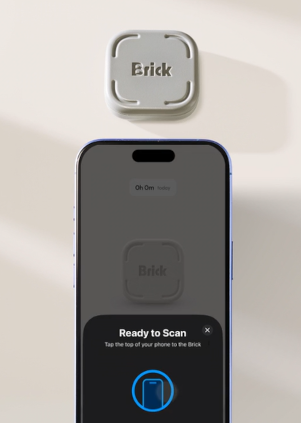
How Brick Works
Brick is a small NFC device. NFC, or near-field communication, is the same short-range wireless technology commonly used for contactless payments and tap-to-pair accessories.
The Brick itself doesn’t need a battery, charging cable or internet connection. Users create a mode in the mobile app, choose which apps or websites should be unavailable, and tap the phone against the Brick to activate the restriction.
The physical device doesn’t perform the blocking itself. It acts more like a key that tells the app when restrictions can be activated or removed. Instead of dismissing a limit from the phone, users can leave the Brick elsewhere and require themselves to physically return to it before regaining access.
Apple’s Screen Time and Android’s Digital Wellbeing can already limit app use without additional hardware. Brick’s main difference is the extra physical step required to reverse that decision.
iPhone and Android Enforce Restrictions Differently
Brick provides a similar experience on both platforms, but iOS and Android give third-party apps different levels of access.
On iPhone, Brick relies on Apple’s Screen Time controls. Users grant Screen Time permission and select which apps should be restricted.
Android uses a broader set of permissions. Brick’s documentation lists capabilities including usage access, notification access, overlays and an Accessibility Service. These allow the app to detect when selected applications are being used and place its blocking interface in front of them.
The company’s optional Strict Mode can make restrictions harder to bypass. On Android, that can also involve Device Administrator permission to prevent the Brick app from being removed while a restriction is active.
Users Can Create Different Blocking Modes
Brick does not require users to disable most of their phone.
The app supports up to 10 custom modes, according to the company, allowing different sets of restrictions for situations such as work, studying or bedtime.
A mode could block social media while leaving navigation, messaging and email available, for example. Users can also take the opposite approach and specify which apps should remain accessible.
Restrictions can be activated directly from the app without having the physical Brick nearby. However, returning the phone to normal generally requires scanning the Brick.
The company also provides five “Emergency Unbricks” that can restore access without the physical device if it is lost or unavailable. Additional emergency unlocks can be requested after those have been used.
Brick currently supports iPhones running iOS 17 or later and Android phones running Android 12 or later. Android devices also need NFC support for the physical tap to work.
One Brick can be used with multiple phones, according to the company, and a single phone can also be paired with more than one Brick.
That makes it possible, for example, to keep one Brick at home and another at work or to share a physical device across multiple phones.
Instead of keeping every control on the same screen as the distracting apps, Brick moves one of those controls into a physical object that can be left somewhere else.
Whether that changes someone’s screen habits will depend on the individual. But as a piece of technology, Brick demonstrates how adding a small amount of physical friction can change the way an existing software feature is used.
Grab it on Amazon today!
Leave a Reply